At Rapid Global, we understand that incident reporting is *essential *for workplace safety compliance.
This means keeping administrators, employees, contractors, and visitors at the centre of every decision, to make incidents easy to report, straightforward to manage, insightful for decision-making, ready for regulatory compliance, and effective at preventing future harm.
Our clients identified these as the most critical priorities. These past few months, we’ve focused our efforts on those fronts, while addressing all the feedback the Beta version received.
Incidents that are easy to report
Report anytime, anywhere (even offline)
Incidents can be reported from anywhere: via web browser, mobile apps, Access tablets, QR codes, or automatically via Rapid Aware.
This means anyone *who attends your premises, whether they are employees, contractors, or visitors, can report incidents in whatever way is most convenient for them.
Mobile, Tablet and QR code reports can be configured to capture just the essentials, making reporting quick and simple – administrators maintain full control over which fields to enable or require.
Mobile also allows for offline Incident reports, for those sites that struggle with consistent internet connectivity.
A clear path through the form
When reporting incidents, a new progress bar on the left shows the sections that need to be filled in, and allows for navigation between sections, reducing the need to scroll.
Progress is saved as you move through sections, and the form adapts to your input. Additional sections like the Injury Report, appear only when relevant, keeping the form clean and focused.
We’ve reorganised the layout too: essential details about what happened and where come first, followed by additional information in a logical sequence. Photos, videos and supporting files have a more prominent spot – simply click, drag, or scan a handy QR code.
What’s next
The easier it is to report an incident, the more likely it is to be reported, and the less likely critical information slips through the cracks.
We’re leveraging AI to capture the minimum information needed from users in the simplest, most natural way possible, like uploading a photo or typing what happened in plain language, while ensuring administrators aren’t burdened with reclassifying incorrect reports.
Psychosocial incidents are a priority for regulators and organisations, yet they remain some of the most burdensome to report. People need a safe space to come forward. We’re addressing this with two key features: anonymous incident reporting, and the ability to restrict access to Incident and Investigation reports based on sensitivity levels across four categories (Public, Internal Use, Sensitive, and Restricted).
Reports that are straightforward to manage
A streamlined Incidents list
The Incident list is cleaner and flatter for better readability, making it easier to scan, filter, and navigate through multiple reports.
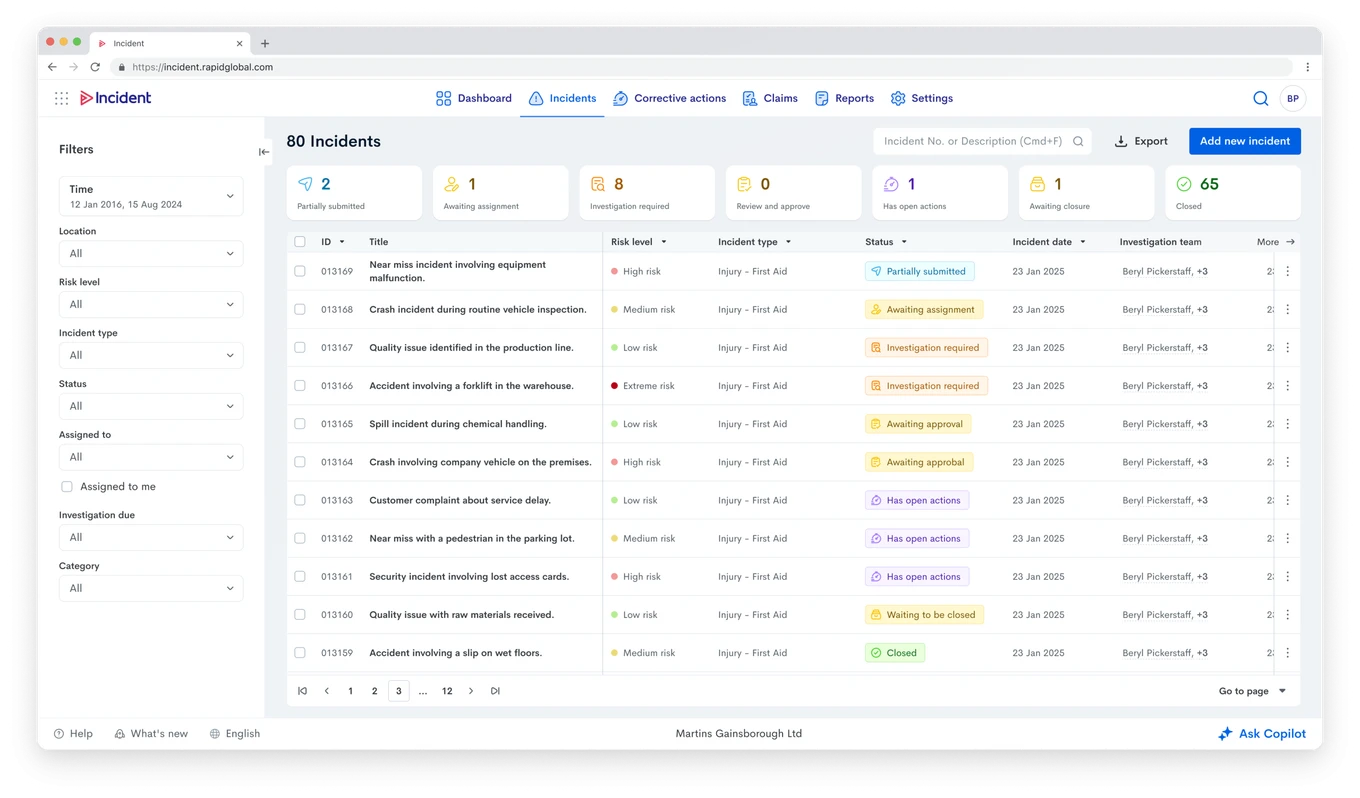
Each row displays the number and progress of a report’s Corrective Actions, to ensure nothing falls through the cracks. Overdue investigations are the only red highlight left on the page, to draw attention quicker, with the Lead investigator’s name is always visible, to assist with accountability.
Incident report statuses have been reworded as clearer calls to action. Investigating* used to cause confusion, as it meant an investigator was assigned, not that any work had begun – Investigation Required removes that ambiguity. Similarly, Review and Approve and Awaiting to be Closed clearly indicate what action is needed next. We’ve also started displaying closed reports, which were previously hidden, giving you visibility into completed work.
Filters have been updated as well. A new Assigned To filter and column helps find reports based on people in the distribution list, while the Assigned To Me checkbox turns the list into your personal to-do list with one click.
Activity Logs for simple audit trails
Activity Logs appear throughout the Incident Report, highlighting important milestones and the user behind each of them for easy audit trails, with user details one click away. Full audit logs are still available, and exportable to XLS.
Dynamic Incident Reports
Clicking on a row opens the Incident Report in a side panel, so you do not lose your place in the list, and it has been redesigned for interactivity, with key elements clickable throughout.
Essential actions are integrated directly into the report: print, create claims, or close, without navigating elsewhere. The kebab menu also organises options with the next step prominently at the top, so the workflow becomes intuitive. Rapid just shows you what comes next.
We’ve enhanced visibility of critical information: severity levels and statuses are displayed and colour-coded at the top, while quick-access shortcuts lead directly to Injured Person details and Corrective Actions (if any).
Smarter Investigations
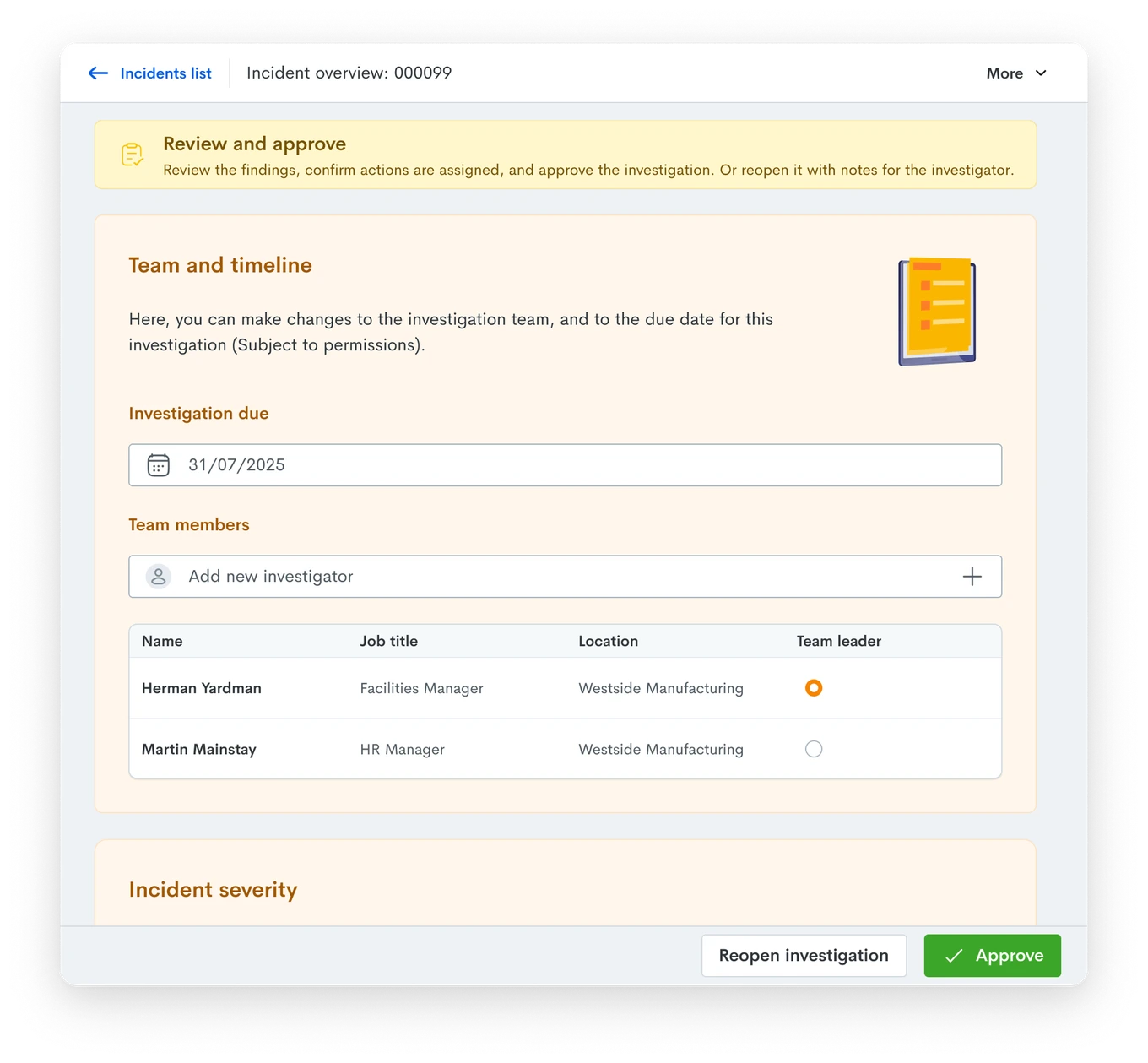
Instead of loading as a full page, Investigations now open in a side panel, saving time and clicks. The original incident report remains visible inline for easy reference, and the view can be toggled on or off as needed.
We’ve used a distinct yellow background to clearly differentiate investigation content from the original report, helping you stay oriented.
More visibility on Corrective Actions
Actions’ statuses can be reviewed at a glance with colour-coded squares at the top of the list. New filters on the left, including Status *and Assigned To, help you quickly find the actions that matter.
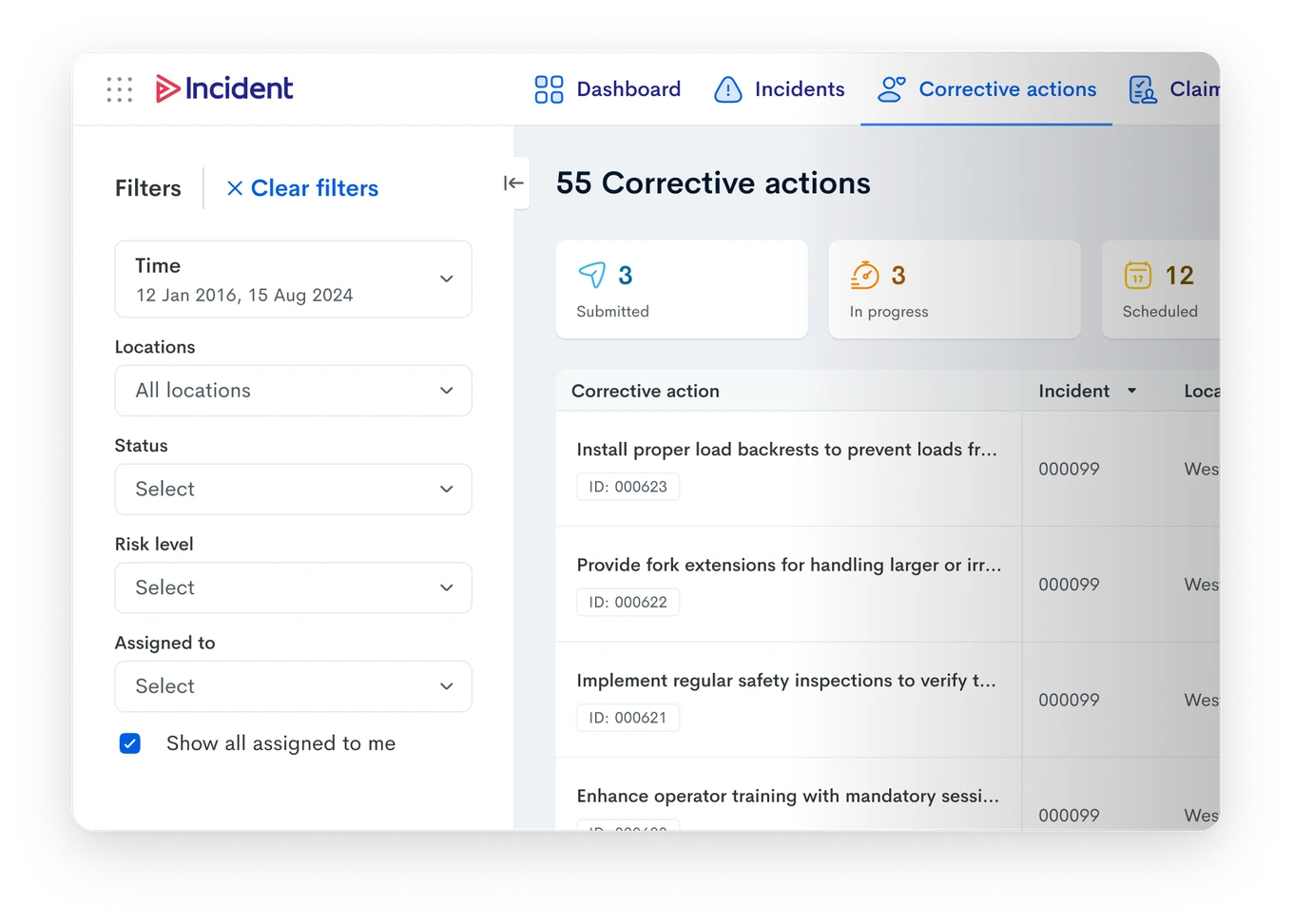
Each action now has its own ID for easier tracking and reporting. Managing actions is simpler too: a convenient menu lets you close actions, add progress notes, print details, or review audit logs.
Need more information? Click any action to open its details in a side panel, complete with Activity Logs tracking all changes and the users behind them.
What’s next
We’re building features to further reduce administrative burden while improving the quality of your incident data.
When the full Incident form is needed, AI will guide users through filling in required data every step of the way through a chat interface. This ensures comprehensive information is captured upfront, minimising the work administrators spend following up or correcting incomplete reports.
Investigations often need to follow industry-standard methodologies to ensure problems are thoroughly explored and root cause analysis is done properly. We’re introducing structured Investigation Protocols to give teams the frameworks they need to conduct rigorous, compliant investigations.
Reports that allow for data-driven decisions and regulatory compliance
Beautiful, actionable data visualisations
We’re bringing the visual power of Charts and the detailed insight of Reports together, giving you both crucial data and presentation-ready visualisations.
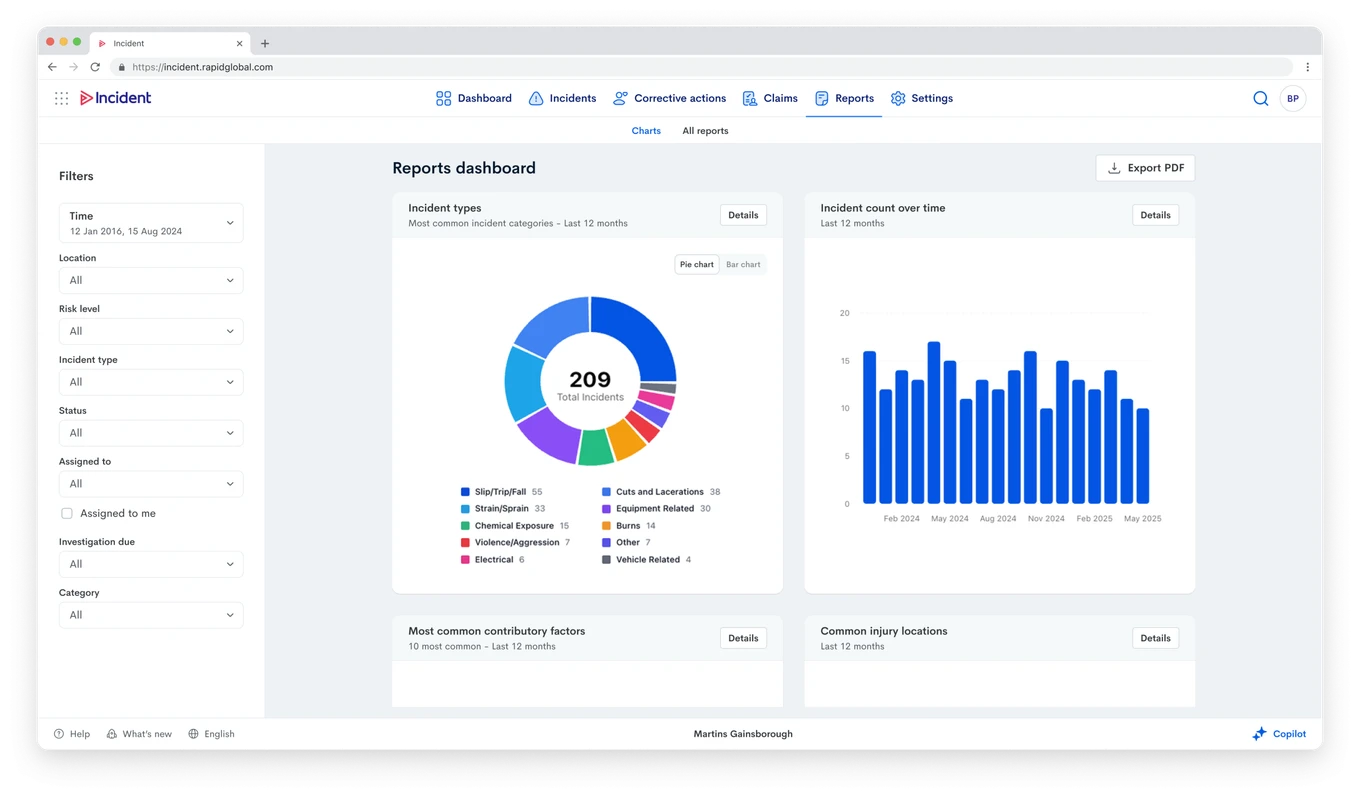
We heard your feedback about outdated colours and design, Charts now use modern libraries that make everything look sleeker and more professional. You can filter charts directly and view or export their underlying details, effectively turning any chart into a comprehensive report. This makes it easy to grab polished graphs for PowerPoint presentations or regulatory reporting.
Reports have been redesigned with the same beautiful new styling, and we’ve added CSV export options alongside updated PDF exports that look professional and ready to share.
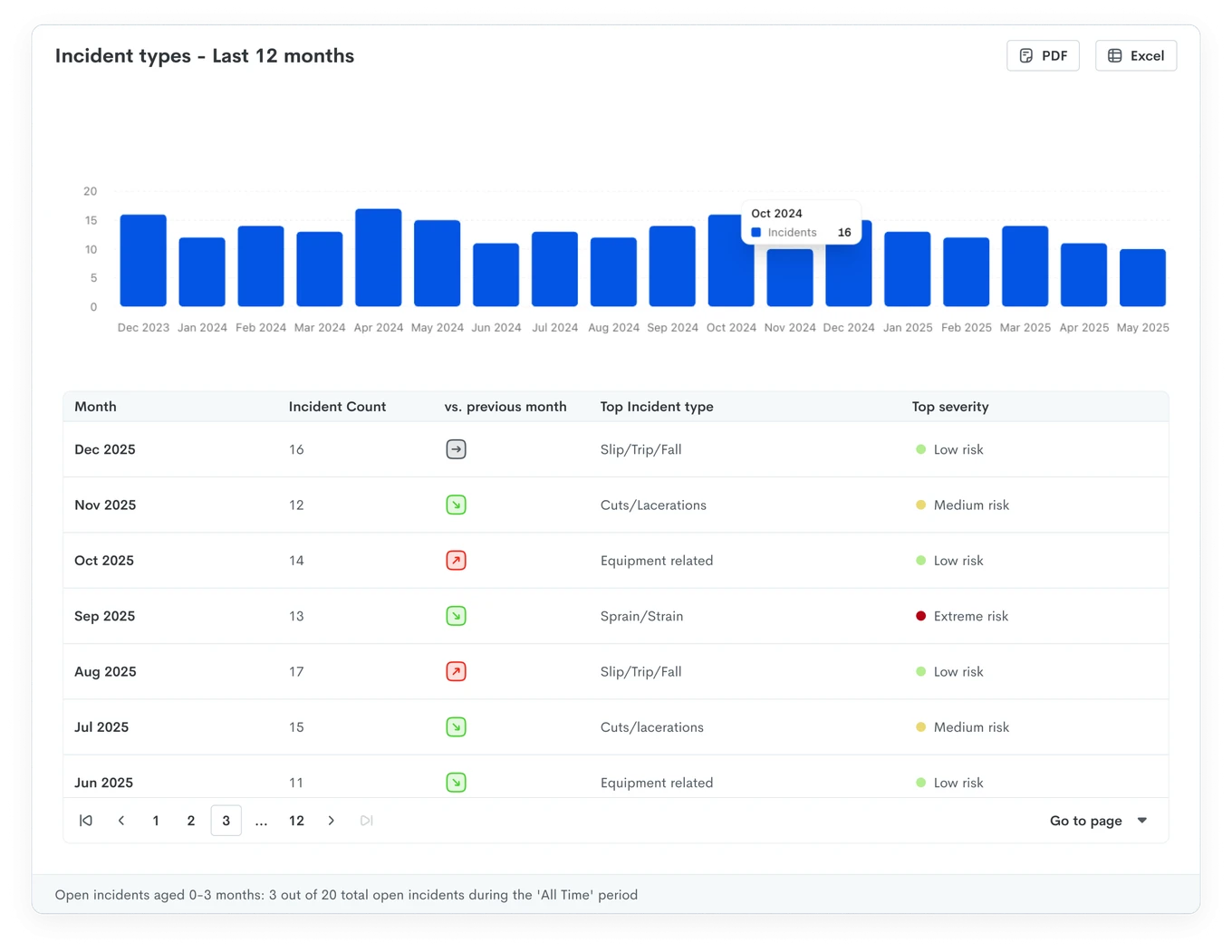
We’ve also refreshed the PDFs generated for individual incident and investigation reports, ensuring every document you produce reflects the quality of your safety program.
Streamlined data exports
We know many of you use Power BI and other analytics tools for deeper KPI analysis.
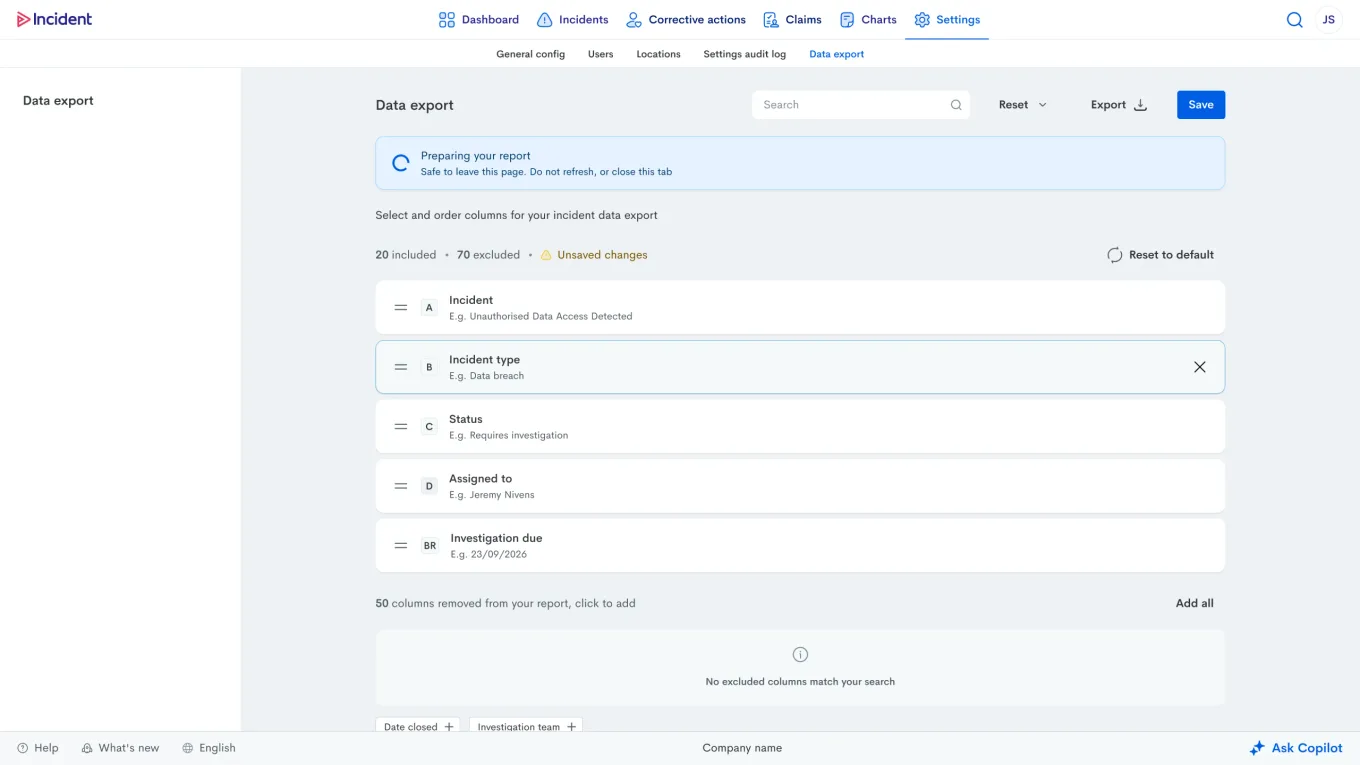
The data export experience has been significantly improved: exports now show progress (no more guessing how long it will take), allow you to reorder columns with a preview of the Excel column letter they’ll appear in, and save user-specific configurations.
Managing claims for compliance
Claims management is critical for regulatory compliance and ensuring incidents are properly documented for insurers and authorities. Claims feature a refreshed UI with status squares, making it easy to track where each claim stands in the process.
If you want to explore Claims for your business, reach out to your Account Manager or our support team for advice.
What’s next
Not every question fits into a pre-built report. We’re introducing a chat-based AI experience that generates custom reports on demand. Need to see overdue investigations? Want a breakdown of incidents by site in a donut chart? Just ask. Describe what you’re looking for in plain language, and the AI will query your data and create the visualisation or report you need
Software that helps prevent future harm
Technology’s greatest promise in workplace safety is enabling organisations to move beyond reactive incident logging toward proactive hazard prevention and automated detection.
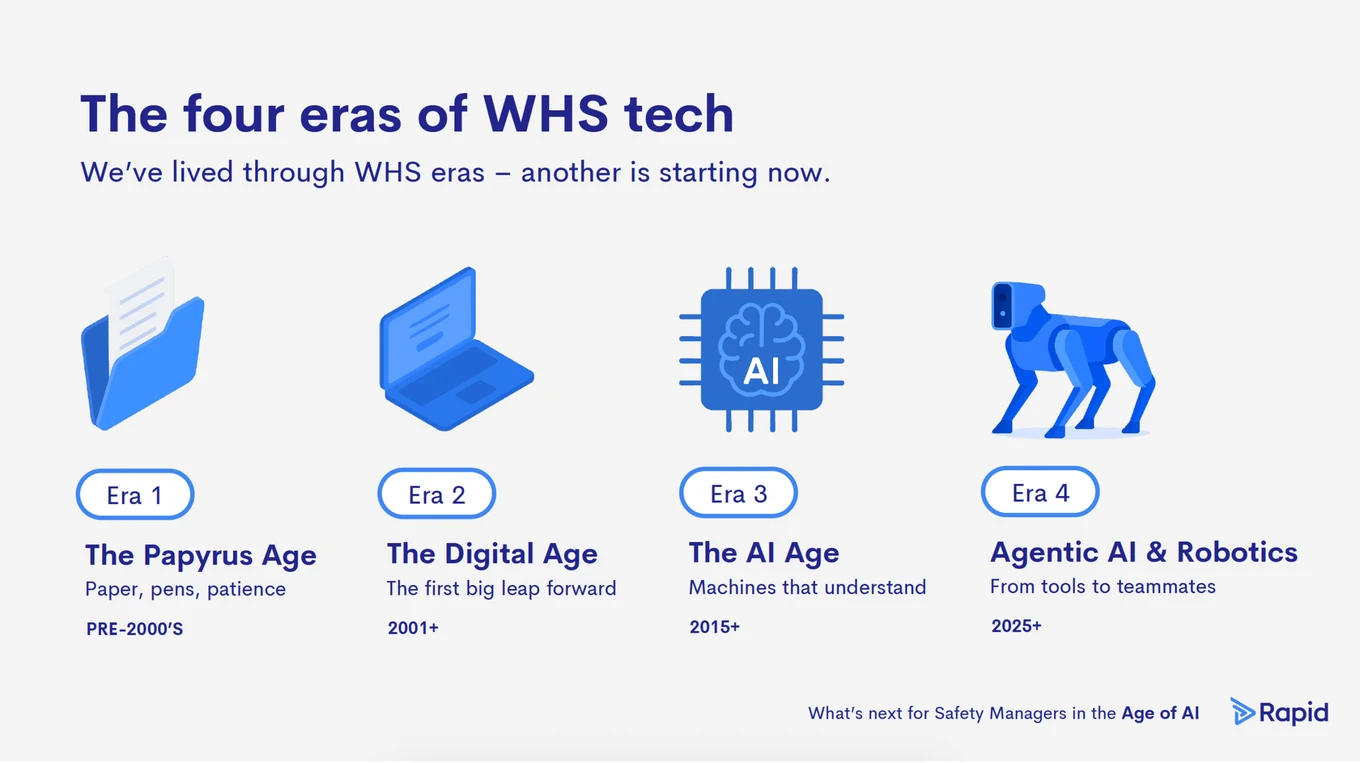
This shift matters because, as our customers consistently tell us, traditional reporting systems miss critical information—incidents go undocumented, hazards slip through unnoticed, and opportunities for intervention are lost. Every step toward automated, proactive safety monitoring creates safer workplaces.
Rapid Aware integration
We’ve taken our first step toward automating hazard detection using computer vision: Rapid Monitor users can now create Incidents directly from failed Safety Checks, such as forklift near-miss events, missing PPE, and fall detection.
Incidents include a thumbnail of the event and its date and time, and are created with Partially Submitted status, allowing Administrators to add more information to the Incident Report before triggering an investigation.
Additionally, Administrators can play back the event in Rapid Monitor, export the video file, and review Safety Checks analytics for further insights.
What’s next: expanding detections with Scope
We’re also developing Scope, a robot dog designed as a movable camera that works seamlessly with Rapid Aware. Unlike fixed cameras, Scope can autonomously navigate your premises to clarify flagged events and provide better angles for safety tracking. When a hazard is detected, Scope can move to investigate, capture clearer images, and even issue audible alerts, taking proactive safety monitoring to the next level.
Join us in shaping the future
Thank you for your continued feedback as we’ve refined Rapid Incident Reporting. Your insights have been instrumental in shaping these improvements, and we encourage you to keep using the Send Feedback option within Rapid Incident. We’re listening!
Stay tuned for feature announcements in the coming months, as we continue this journey towards safer workplaces together.
Subscribe to the monthly newsletter to receive the latest work health and safety information straight to your inbox.