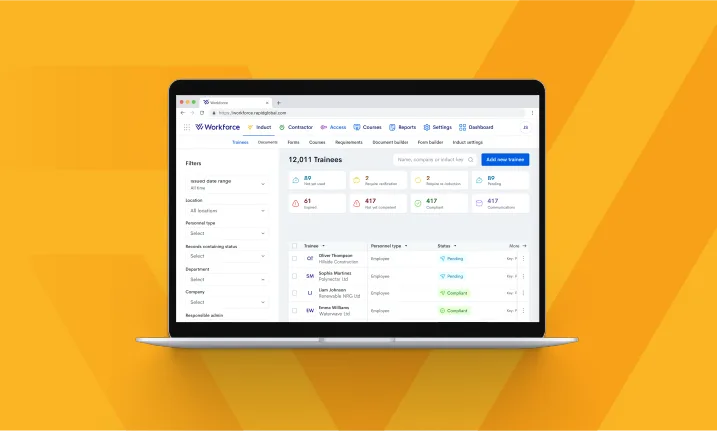
Are you already using Rapid Induct to manage your site training and inductions? This blog will help you incorporate each of your organisation’s site offices and job sites — as well as individual job roles – into your training processes. The release of Rapid Induct’s new UI upgrade provides the perfect time to reflect and explore our award-winning software.
Not yet using Rapid? Read on and learn how Rapid Induct can make your employee training, administration and contractor management so much easier.
Create online training modules
Rapid Induct is an efficient way to manage all your training needs, whether you control one job site or 50. Not only can you create unlimited, fully customisable courses, but we offer free pre-written courses or the ability to seamlessly import pre-purchased SCORM courses if you’re stuck for time.
From employee onboarding, to safety, technical skills, product and service training, our back of house system is easy to use. It allows you to leverage the latest multimedia technologies, plus include policies, procedures, assessments, and acknowledgements.
Recommended reading: Is your company induction program effective?
Assign training for specific job roles, time periods, and locations
We all know that training is more effective when it is personalised and staggered over a number of months — or the whole year. With Rapid you can:
- Set reminders at regular intervals — general fire safety training set for every 12 months.
- Configure pre-requisites — Module 2 unlocks after Module 1 is completed successfully.
- Assign different modules to different people — Office Manager completes a different set of modules to the welding apprentice.
Rapid Induct also integrates perfectly with Rapid Contractor Management and Rapid Access. So, if an electrical contractor turns up at the job site without completing their induction they’ll be marked as non-compliant (Rapid Contractor Management) and denied access at the front gate (Rapid Access).
Upload key documents
Do you struggle to keep on top of the mountain of licences, certificates, IDs, and insurances required by your employees, workers and contractors? Rapid Induct meets this challenge, by storing all your documents in one secure area. Here’s a quick overview of how it works:
- Assign job roles to employees — Joe Black is a crowd controller working at venues in NSW and Victoria. He is assigned the job role NSW Security Guard and Victorian Crowd Controller.*
- Create a document type in the system — driver’s licence, first aid certificate, working at heights permit, crowd controller’s licence.
- Assign the document to a job role — aged care* nurse requires flu vaccination certificate, current CPR, and nursing registration.*
- Have employees upload their documents — a contractor is asked to upload their plumber’s licence and public liability insurance policy when they complete their induction training.
- Documents are reviewed by your compliance team —* Jill Black has uploaded her driver’s licence to the portal, but it is unreadable. The compliance team rejects Jill’s drivers licence, and she receives an instant notification to upload the document properly.*
The newly designed document viewer available in our UI upgrade allows you to view all the necessary information in one accessible screen. Transitioning between documents for approval is now a seamless, one-click process.
Manage compliance in different regions
One of the best things about Rapid Induct is being able to assign regional locations to individual job sites — as well as specific employees and training modules. This streamlines compliance for complex organisations that have hundreds of employees and contractors. You can even qualify people to work at sites in different states.
Let’s say you’re a hotel chain with venues in NSW, QLD and Victoria. All of your staff (including crowd controllers) will require a Responsible Service of Alcohol (RSA) certificate, but because of variations in state legislation the certifications are different for each state.
Rapid Induct is so sophisticated that the hotel chain can configure each of their venues according to their home state — then pre-qualify their workforce and assign them to different venues. Now their security guard Joe Black (who lives on the NSW/Victorian border) can be approved to work in venues in both states.
Set reminders and notifications
Rapid Induct operates in real time — and the system can be configured to send instant notifications as workers complete their training. Here’s a few smart examples (but it’s really up to you):
- HSE Manager* — an apprentice has failed their second attempt at the welding module.
- Contracting company — a contractor has completed their induction and is ready for work on site.
- Head Office — an employee with expired safety training was granted access to a regional worksite.
Customising Rapid Induct to your site needs
Would you like to know more about how Rapid Induct can be configured for your organisation’s site locations, and regional laws? Get in touch with the Sales team here at Rapid for personalised advice and a full software demonstration. Contact us today.
Subscribe to the monthly newsletter to receive the latest work health and safety information straight to your inbox.