

This month’s updates are focused on the Workforce Management platform, with new additions to our Rapid Contractor Management and Rapid Induct products. You can now export trainee requirements to Excel, pick up where you left off with saved filters and use your own wording for the consultancy question. We’ve also made fixes and improvements across our Workforce products.
Export your trainee requirements to Excel
Keeping on top of trainee requirements across a large workforce often means checking records one by one, or rebuilding the same view by hand in a spreadsheet for reporting, audits, or a quick status check with a site manager.
You can now export all of your trainee requirements straight to Excel in just one click. Every requirement and its current status comes through as a single file that you can filter, sort and share however you need, or drop it straight into your existing reporting.
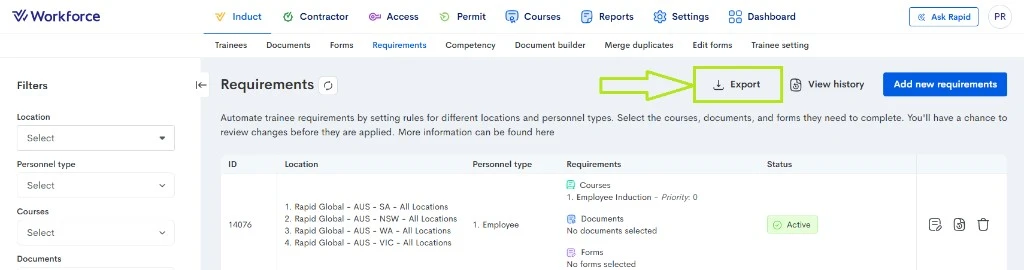
To get started, head to Requirements in Rapid Induct and select Export. Your file will download straight away, ready to open in Excel.
Learn more about Rapid Induct →
Your filters, saved for next time
If you check the same view every day, you know the routine. You log in, set your filters again, and only then get to work, whether that’s expiring inductions on one site or a single contractor company.
Rapid Induct and Rapid Contractor Management now remember your filters. Set them once and they’ll be waiting for you the next time you log in. Your view picks up where you left off, so you can get straight to what matters.
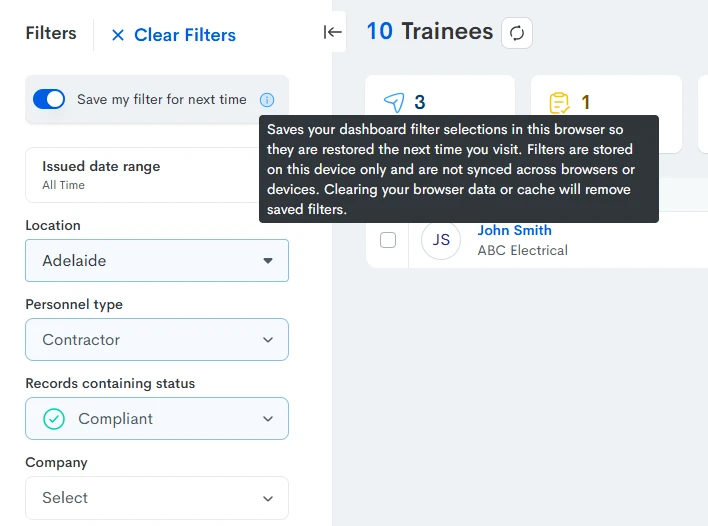
Your filters save automatically as you use them and you can clear them at any time to return to the full list.
Learn more about Rapid Contractor Management →
Tailor the consultancy question to your requirements
Every organisation defines consultancy work a little differently, but how it is defined is important. It often decides whether a contractor needs to hold professional indemnity insurance and which requirements apply to them.
Until now, the consultancy question your contractors answered was fixed, with the same wording for every client. This left room for contractors to misread it and answer in a way that didn’t reflect your intent.
You can now use your own wording for the consultancy question, aligned to your professional indemnity and contractor requirements. Contractors see the question in your terms, which means clearer answers and the right requirements triggered from the start.
The standard question stays in place by default, so nothing changes until you ask for it. To configure your own wording, reach out to your Rapid Global representative.
Bug fixes and improvements
We have also shipped a number of fixes and smaller improvements across Rapid Contractor Management and Rapid Induct this month:
- Optional documents uploaded by inductees that require verification now appear in your Awaiting Approval list, so nothing slips through without review.
- Course settings now save correctly in the course editor, including the Welcome, Final, Mission Statement, Checklist and Acknowledgement sections.
- Pre-employment forms no longer get stuck awaiting verification after the pre-employment setting is turned off. Auto-approval and multi-level approval now work as expected.
- Bulk reminder emails for rejected or pending documents now send without error.
- When you update a course’s re-induction period and apply it to all current inductees, the confirmation message now makes clear the change is processed overnight.
- Renewed primary documents, such as Workers Compensation and Public Liability certificates, now handle policy start and expiry dates more consistently when verified.
- The Rapid Contractor Management report no longer shows types of work linked to deactivated personnel types.
- Deactivated admins can now be reactivated directly, without being blocked by the admin transfer check that applied on deactivation.